Showing posts with label Search. Show all posts

Wednesday, 27 November 2013

Setting the Default Search Provider to Google in IE

I’ll forever struggle to remember how to configure Internet Explorer 11/10/9/etc to use Google and not Bing when searching from the address bar. Sure you can add providers from the Manage Add-ons menu but it never seems to work for me as the list of search providers that appears on the IE Gallery site—when clicking through from IE itself—doesn’t seem to include Google.

Instead I follow this URL in IE, click the button and tick all the boxes on the popup:

http://www.iegallery.com/en-us/Addons/Details/813

Google Search Provider

If you found this post helpful, please support my advertisers.

Tuesday, 21 December 2010

grepWin–A lightweight replacement for Windows Search

I don't know if Windows Search on my Windows Server 2008 R2 machine is crippled because it's a server machine (I'm all set up to run Search) but I invariably have trouble finding strings I know exist in files. In other words, search in files or search in content doesn't seem to work despite my configuration, rebuilding the search index, and pulling my hair out.

Having yet another service running that indexes the majority of the non-system files on my computer also doesn't really appeal and for that reason (among others) I've also decided I don't want to add more search indexing with the likes of Google Desktop Search.

In fact, what I want is a lightweight search application that I can occasionally use with regular expressions. It should be fast and convenient to use, preferably without a command line. I want to be able to specify a start directory and optionally have it search subdirectories and file contents.

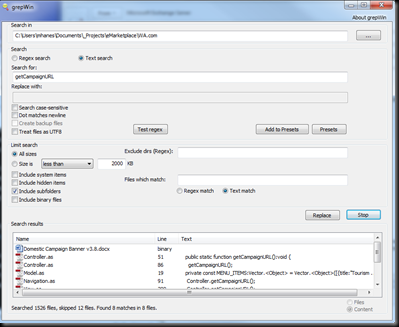
And here is a tool that meets all of the above criteria: http://tools.tortoisesvn.net/grepWin.html

(FWIW, this is not an infomercial—I haven no affiliation with Stefan or grepWin and am not paid to write this)

grepWin is 64-bit compatible and Stephan offers an installable version that offers Explorer context menu integration or a portable version that doesn't need to be installed.

There's no indexing involved so you'll likely want to narrow the start location of your search as much as possible but it's still fast.

Your search can be case sensitive or not and you can limit file sizes. A search can also exclude directories.

The results pane lists file details (size, path, date, etc) and also offers a content view so you can preview the match.

Search settings are automatically persisted so using the tool is incredibly convenient.

grepWin

If you found this post helpful, please support my advertisers.

Thursday, 2 September 2010

miisclient.exe success output

Partly for the glory but more for posterity (my own future reference!), I've screen captured what a successful SharePoint 2010 AD user profile synchronisation looks like in the FIM client:

miisclient-synchronization-successWill this gain me entry to a special club or something? If so, thanks Spence! Now to work through all the event log errors and warnings… perhaps I ought to call it a day!

If you found this post helpful, please support my advertisers.

Wednesday, 23 June 2010

Use BackConnectionHostNames instead of DisableLoopbackCheck in production

If you're running SharePoint, you may have come across advice to configure the DisableLoopbackCheck registry key if you're running Windows 2003 SP1 and above and/or .NET 3.5 SP1.

Adding the DWORD will certainly keep you up and running and avoid search/crawl errors like the below but it's not the way to be doing in a production environment, despite popular belief.

Access is denied. Verify that either the Default Content Access Account has access to this repository, or add a crawl rule to crawl this repository. If the repository being crawled is a SharePoint repository, verify that the account you are using has "Full Read" permissions on the SharePoint Web Application being crawled. (The item was deleted because it was either not found or the crawler was denied access to it.)

What you should be doing in production is configuring specific sites by name using the BackConnectionHostNames Multi-String Value below HKEY_LM\system\CurrentControlSet\Control\LSA\MSV1.0. The Microsoft KB article isn't clear about the format this value should take but I've found adding each site without the scheme on a new line works.

Here's an example:

intranet1.site.com
intranet2.site.com

Bob Fox additionally suggests adding a new DWORD named DisableStrictNameChecking with a value of 1 to HKEY_LM\system\CurrentControlSet\Services\Lanmanserver\parameters and rebooting to avoid having to reboot every time a new site is configured. I got away without rebooting at all by simply restarting the IISAdmin service.

Sunday, 6 December 2009

The Keywords Meta Tag Doesn’t Matter

Every wondered if the major search engines still consider the keywords meta tag? Well most don’t and haven’t for a very long time. Here’s the latest from the search engine driving the majority of search-based traffic to your sites:

http://googlewebmastercentral.blogspot.com/2009/09/google-does-not-use-keywords-meta-tag.html

Manual keyword maintenance, automated keyword builders, and so on: goodbye and good riddance!

Friday, 17 July 2009

PDF iFilter not indexing content

Don’t forget: installing and configuring an iFilter to allow SharePoint to search PDF documents won’t index graphical PDF content. In other words, if search is returning PDF results based on title or other meta data but not PDF content, double-check whether that content can be highlighted and copied to notepad as text—and watch out for scanned documents!!!

Sunday, 21 June 2009

Access is denied. Check that the Default Content Access Account has access to this content

I ran into this error in the crawl log for the Local Office SharePoint Server sites content source:

Access is denied. Check that the Default Content Access Account has access to this content, or add a crawl rule to crawl this content.

I had configured the default content access account within the search administration and granted Full Read access to the same account from Central Admin\Application Management\Policy for Web application; the site to be crawled also had an include crawl rule configured. As a test, I also added the default content access account to the [SiteName] Visitors group with no effect. Oddly enough, some of the site content was being crawled (well a single document anyway) but I just don’t like error messages ;-)

The environment in question is a Windows 2003 SP1 machine with MOSS 2007 SP2 and .NET 3.5 SP1. It’s a dev environment and it’s also configured with the Active Directory and DNS roles and runs SQL Server 2005 SP2. Site-wise, MOSS is hosting a single test site configured to use a host header on port 80 with a DNS A record pointing to 127.0.0.1. And therein lay the problem…

Apparently Windows 2003 SP1 introduces a “loopback check security feature […] designed to help prevent reflection attacks.”

http://support.microsoft.com/kb/896861

The KB article also describes two work arounds for the problem, the first being to list the host names mapped to the loopback address (127.0.0.1) and the second disabling the security check.

Method 1: Specify host names

Specify the host names that are mapped to the loopback address:

  • Click Start, click Run, type regedit, and then click OK.
  • In Registry Editor, locate and then click the following registry key:
    HKEY_LOCAL_MACHINE\SYSTEM\CurrentControlSet\Control\Lsa\MSV1_0
  • Right-click MSV1_0, point to New, and then click Multi-String Value.
  • Type BackConnectionHostNames, and then press ENTER.
  • Right-click BackConnectionHostNames, and then click Modify.
  • In the Value data box, type the host name or the host names for the sites that are on the local computer, and then click OK.
  • Quit Registry Editor, and then restart the IISAdmin service.

Method 2: Disable the loopback check

  • Click Start, click Run, type regedit, and then click OK.
  • In Registry Editor, locate and then click the following registry key:
    HKEY_LOCAL_MACHINE\SYSTEM\CurrentControlSet\Control\Lsa
  • Right-click Lsa, point to New, and then click DWORD Value.
  • Type DisableLoopbackCheck, and then press ENTER.
  • Right-click DisableLoopbackCheck, and then click Modify.
  • In the Value data box, type 1, and then click OK.
  • Quit Registry Editor, and then restart your computer.

Note: In my case this took effect without resetting the server; although other suggestions recommended restarting IIS, I didn’t have to do that either.

Monday, 6 April 2009

westernaustralia.com makes the top 10 MOSS sites

It was really cool to be listed on various MOSS-tracking sites back in the day when www.wwesternaustralia.com was launched nearly two years ago but to be picked out—on a top 10 list by Joel Oleson, next to Ferrari, Cadbury, and Engergizer, no less—at this point in time is incredible.

Joel in particular comments on our “great search” but I wonder if he knows it’s not running on MOSS search or the BDC? Searching for tourism western australia moss and tourism western australia bdc brings up some pesky, ancient postings by Angus Logan—a Softie who was previously involved with the site, our move from MCMS to MOSS, and the initial decision to do search with the BDC. These post would have you believe we’re running happily with the OOB MOSS search and the BDC; this is definitely not the case and we’ve actually written our own custom search solution.

If you’re interested in the custom branding work we do at Tourism, have a look at the list of Some of the MOSS sites I’ve Worked On in the sidebar. wa.com is certainly a last example but the other tourism sites have all been provisioned on the same farm from a single site def/feature set.

As a parting comment, looking at the number of heavily-customised MOSS sites out there these days, it occurred to me that maybe this stuff isn't really all that hard to do anymore ;-)

Friday, 12 December 2008

Search 2 Launched on westernaustralia.com

It's been a busy week at Tourism! In addition to pushing out new web sites, my team has also been busy launching the next iteration of search on www.westernaustralia.com. Although wa.com is a MOSS-based web site, it uses a custom search system built in-house to meet an exacting set of requirements and keep half the planet happy. 

Search 2, as it's known internally, started out as a retrofit of the tours search sub system but quickly evolved into a full rewrite to make search faster, more accurate, and more configurable while introducing new features like spelling suggestions. 

Tourism WA has a paid membership model where tourism operators pay an annual fee to join the Tourism WA Network in return for a listing on westernaustralia.com. As a result, everyone wants to see their product listing on top of the pile when it comes to search results. We also have a lot of custom content on the web site: if you search for "Perth", the MOSS content page related to Perth is listed first; if you search for "hotel", you're probably after accommodation products but the display of the hotel listings in WA are randomised to ensure fairness. Trust me, these are some simple examples--what we end up with is a complex business logic that dictates how search results are weighted and ranked. 

The search implementation on wa.com has a long and sordid history. We started out using the in-built MOSS search and the BDC, crawling MOSS page content and tourism product stored in the Australian Tourism Data Warehouse. The BDC is a great tool for unifying disparate data sources but MOSS search simply didn't give us the configurability required to deliver on the business requirements. 

When panic set in, a Google search box was evaluated. While it did search, as you might expect, it only searched the Google way; it's still sitting in the server room, unused. As everyone fretted over the many problems we were facing, Rick, the developer working on search, went "underground" and built the RDC--or Rick's Data Catalog. The RDC would eventually replace the BDC and MOSS search in our little world. wa.com was launched with this solution, which is actually build on SQL Server Full Text indexing.

The RDC got us across the line after a never ending round of user acceptance testing but fell down in the tours category. It also abused some of the more horrific technologies from some of our older sites like XSLT and inline C#. It was also just a messy proof of concept at the code level and had some major design flaws. An example of the latter was a crawler that couldn't be scheduled and cleared the main index table before initiating the crawl; the problem with this approach was no search results would be returned while the crawler was run--apart from the manual administrator intervention required to actually kick it off and verify the results.

Search 2 is one of those engineering marvels you come across so rarely in the software world. The underlying design is fairly straightforward for what it does and it uses the chosen technology set appropriately--judiciously and as required. In other words, it's not over-engineered and gets on with the job in a logical, unobtrusive way. The grunty data work is relegated to the database where it belongs and the main UI is composed of configurable web parts. 

That's not to say Search 2 didn't take a while to build. Nico, one of most experienced team members when it comes to MOSS and search, has been hard at work on this project since April. UAT progressed over a month and deployment took three days! 

We're already building on top of the Search 2 fundamentals Nico has in place. An online booking engine has passed the proof of concept stages and a new itinerary planner should be out in the new year. Search 2 will also form the basis for a search re-release on the partner sites, which adds another few dimensions to the mix. Working with the Search 2 code base to integrate these components has almost been pleasurable. Either way, who can complain when all of the project stakeholders are happy?!  

Nico's off for a well-deserved Christmas break and I'm quietly confident we won't have any major bedding in problems during the four weeks he's away (unless the database server dies but that's another story). Meanwhile, Search 2 should be humming happily along--have a look for yourself!


Custom-Built Microsoft Office SharePoint Server 2007 Branded Sites and Webpart Development - info@mediawole.com