Tuesday, 21 December 2010

grepWin–A lightweight replacement for Windows Search

I don't know if Windows Search on my Windows Server 2008 R2 machine is crippled because it's a server machine (I'm all set up to run Search) but I invariably have trouble finding strings I know exist in files. In other words, search in files or search in content doesn't seem to work despite my configuration, rebuilding the search index, and pulling my hair out.

Having yet another service running that indexes the majority of the non-system files on my computer also doesn't really appeal and for that reason (among others) I've also decided I don't want to add more search indexing with the likes of Google Desktop Search.

In fact, what I want is a lightweight search application that I can occasionally use with regular expressions. It should be fast and convenient to use, preferably without a command line. I want to be able to specify a start directory and optionally have it search subdirectories and file contents.

And here is a tool that meets all of the above criteria: http://tools.tortoisesvn.net/grepWin.html

(FWIW, this is not an infomercial—I haven no affiliation with Stefan or grepWin and am not paid to write this)

grepWin is 64-bit compatible and Stephan offers an installable version that offers Explorer context menu integration or a portable version that doesn't need to be installed.

There's no indexing involved so you'll likely want to narrow the start location of your search as much as possible but it's still fast.

Your search can be case sensitive or not and you can limit file sizes. A search can also exclude directories.

The results pane lists file details (size, path, date, etc) and also offers a content view so you can preview the match.

Search settings are automatically persisted so using the tool is incredibly convenient.
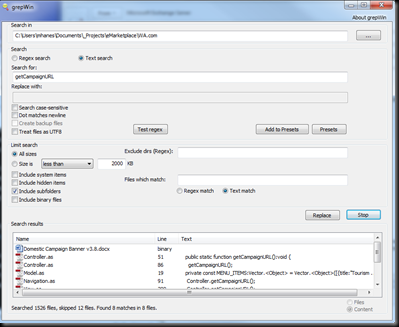
grepWin

If you found this post helpful, please support my advertisers.

Wednesday, 15 December 2010

How to disable web part chrome

In the context of a highly-branded WCM site, the default "chrome" (border and title) SharePoint wraps around your custom web parts can be ugly and inconvenient. At worst, it will make your site look SharePoint-y and require every web part added to a page to have its Chrome settings manually adjusted.

Chrome Type

That's no way for a web part to behave in content management system but what to do?

In the past I've set the chrome type explicitly for each custom web part, either in the .webpart/.dwp file itself or programmatically:

<property name="ChromeType" type="chrometype">None</property>

this.ChromeType = PartChromeType.None;

To avoid doing this per web part (or cluttering up your nice little base web part class), you can set the PartChromeType property on the WebPartZone declared in your page layout:

<WebPartPages:WebPartZone id="wpzLeftColumn" runat="server" title="Left Column" PartChromeType="None">

Any web parts added to that zone with a default Chrome Type (aptly named "Default") will inherit this setting from the web part zone. Of course individual web parts can override this as required.

If you found this post helpful, please support my advertisers.

Enumeration-based property with initialiser fails to load in tool pane

I encountered what is likely an obscure issue today while using an existing enumeration to populate a drop down list in the tool pane of a SharePoint web part.

The web part didn't require a custom toolpart so I'm referring to a web part property defined within the web part class itself:

[SPWebCategoryName ("TWA")]
[FriendlyNameAttribute ("Region Override")]
[WebDescription ("Explicitly configure the region displayed when the mode is set to Region.")]
[Personalizable (PersonalizationScope.Shared, false)]
[WebBrowsable (true)]
public WARegions RegionOverride { get; set; }

Notice how the public RegionOverride property has a type of WARegions. Normally, the end result is an additional custom property displayed in the web part tool pane; in this case, the WARegions type is an enumeration and SharePoint therefore renders this as a drop down list:

Enumeration DDL

I say normally because today I was only getting a disabled DDL containing a single item ("Perth"). SharePoint was also kind enough to present me with this vaguely useful error message:

Some of the properties for this Web Part cannot be displayed properly. For more information, see your site administrator.

The WARegions enumeration is an existing enum I chose to reuse for the sake of convenience. Upon further inspection, I noticed the first element in the enum (Perth) was explicitly assigned a value of 1. Acting on my suspicion, I removed the explicit assignment and the DDL would then display as expected.

As a final test to confirm whether the explicit initialisation was somehow behind the single list item being displayed, I set default values for all elements in the enum but the error returned. Fortunately in my case I can do away with the explicit initialisation (which I'm not keen on—I prefer to initialise enums myself).

If you found this post helpful, please support my advertisers.

Monday, 13 December 2010

My custom Visual Studio keyboard shortcuts

I do all of the builds in my position as Development Coordinator but with the Visual Studio project context menus out of control and nearly unusable with clutter from various plugins (including ReSharper, PowerCommands, and Productivity Power Tools), I've finally cracked.

Since we don't (yet) have a build server, a normal manual build workflow goes something like "do stuff, do more stuff, BUILD, do stuff, OPEN DEPLOYMENT FOLDER IN EXPLORER, copy files to drop folder, etc. Before installing ReSharper, the VS team finally had all context menu items displaying on a single screen, with no scrolling required; ReSharper has ruined all of that again and I now find myself forever scrolling the context menu from the top (Rebuild) to the bottom (Open Folder in Windows Explorer).

Because I'm forever installing Visual Studio in different environments/upgrading/etc, I'm loathe to define custom keyboard mappings (likely a hangover from my days of using the product before Import and Export Settings… was introduced). Nonetheless, these are the shortcuts I've finally created:

Project.OpenFolderinWindowsExplorer – Alt+ O

Build.RebuildSolution – Alt+ R (Why rebuild instead of build? Personal preference)

If you found this post helpful, please support my advertisers.

Friday, 3 December 2010

Relative URLs, the Rich Text Editor, and Reusable Content

We recently started leveraging the Reusable Content list to supply user-editable content to one of our interactive online forms and outbound emails. This allows the content owner to tweak the content as required as this content isn't locked away in custom code or resource files—no build and deploy required and the content management system is even used as such (whatdya know?!).

The Reusable Content list is provisioned by SharePoint when the Publishing feature is enabled; it allows users to define content snippets that can be maintained in a single location and updated automatically wherever they're used. You can optionally treat a reusable content snippet as a template—an editable copy is inserted into the page instead of a read-only, auto-updating view.

Reusable Content list items are pretty straightforward and, most importantly, contain a single HTML (rich text) field. SharePoint naturally displays its rich text editor around this field in edit mode so the edit user experience is similar to editing page content.

Unfortunately HTML fields in SharePoint are smarter than they should be and (in MOSS 2007), the product will mangle some content. I recently discovered it refuses to play with background-image style—they're silently removed whether they're inline or in an embedded stylesheet. (And yes, I know, inline styles are evil but this snippet was actually being plugged into an email so everything had to be self-contained).

Despite the tricks SharePoint plays on you with "managed" URLs, it seems the rich text field also stores URLs pointing to content within the current site as relative URLs. Absolute URLs are converted automagically but you'll never really see this until you pull the content out via the API.

We hunted for a way within SharePoint to convert all relative URLs in this content to absolute URLS but without much luck. I think there may be a Javascript function in one of the client scripts to do so for a chunk of content but there's nothing obvious in the server-side API.

To address this, we replace all relative URLs using the regex below (note the URL group) (is using regex to parse HTML bad? You be the judge). You may want to use SPUtility.GetFullUrl() to convert individual URLs.

@"(?:<\s*(?:a|img)\s+[^>]*(?:href|src)\s*=\s*[\""'])(?!http)(?<url>[^\""'>]+)[\""'>]"

If you found this post helpful, please support my advertisers.

Thursday, 18 November 2010

DateTime format safe for file system

Couldn't find anything similar when I searched so thought I'd throw this out there for use in file names in a Windows file system:

DateTime.Now.ToString ("yyyyMMddHHmmss")

Will output "201001312359"

Add a ".txt" or ".dat" if you're hard-core and you're all set.

If you found this post helpful, please support my advertisers.

Wednesday, 17 November 2010

How to determine if a SPPublishingPage is published

You can programmatically determine if the SPPublishingPage you're dealing with is in a published state by retrieving the SPFileLevel of the page's corresponding SPFile:

if (page.ListItem.File.Level == SPFileLevel.Published) …

You can also access this through the PublishingPage.ListItem.Level property.

The same SPFileLevel enumeration will also indicate if the page is in draft mode (checked in but not published) or checked out but in my experience this property will return SPFileLevel.Published or SPFileLevel.Draft more often than not.

To determine whether the page is checked out, use the SPFile.CheckOutStatus property in WSS 3.0 or the  SPFile.CheckOutType property in SP2010. Any value other than None means the page is checked out.

If you found this post helpful, please support my advertisers.

SPSite.AllWebs vs SPWeb.Webs

There's a subtle distinction between SPSite.AllWebs and SPWeb.Webs to be aware of—and yes, despite this being the SharePoint API we're talking about, it's more than just a naming oddity!

SPSite.AllWebs returns the immediate child webs of the site collection and all of their child webs (in other words, all webs recursively within the site collection); SPWeb.Webs has a much narrower scope and only returns the first level child webs immediately below the SPWeb object.

So what does this mean and how does it benefit you? If you're writing code that recursively walks the site hierarchy using SPWeb.Webs, you may be able to avoid the overhead by simply using SPSite.AllWebs. Recursion is fun and all but it adds complexity where it may not be warranted.

If you found this post helpful, please support my advertisers.

Thursday, 28 October 2010

Free Antivirus for Windows Server 2008

I've been a long time home user of Avast! antivirus. It's a great product that doesn't bog down my machine. Unfortunately the free home edition won't install on Windows Server 2008 R2 and I run a single-boot W2k8 environment because of my Hyper-V love affair.

Don't get me wrong, I normally despise AV and security in any form… the guys I work with are probably fed up with me always shouting "security != productivity" when the bloody proxy policy has once again broken something or prevented me doing my job. But, every now and then, I feel incline to download evil things and God forbid those things include a virus of some kind—a quick scan would then come in handy…

ClamWin to the rescue! Don't know about the name but it doesn't include a real-time scanner which meets my requirements. So far so good… evil things downloaded and appear to be virus free!

Wednesday, 27 October 2010

Empty ImageUrl results in empty src and duplicate request

Not exactly a new issue but an empty ASP.NET ImageUrl tripped us up today. In this case there were no visible symptoms but two requests were coming through when Fiddlering the page view: the first initiated by the user and the second initiated by the page itself towards the end of the trace. In development with a debugger attached, this was manifest with Page_Load, CreateChildControls, etc being called twice for no obvious reason.

Because I initially thought I introduced the problem with the control I was working on, I first attempted to convince ASP.NET CreateChildControls was complete; I did so by clearing the Controls collection before unleashing my own code and setting the ChildControlsCreated property true once done. Neither of these tricks had any affect and the Fiddler trace had me convinced something beyond the ASP.NET pipeline and IIS had to be at fault.

That turned out to be the case but ASP.NET was still to blame ;-)

Specifically, we were adding a server-side ASP.NET image control but not initialising its ImageUrl property; the image src was later being set by jQuery at runtime on the client side. As mentioned, there were no visible symptoms of the double request: the image src was set as expected by jQuery and everything appeared okay on the surface. The IE dev toolbar also showed image src as being correctly set and there were no 404s in the mix.

It wasn't until we looked at the raw HTML that our ever-faithful admin extraordinaire noticed the empty src="" attribute. Removing the attribute removed the problem so I can only conclude IE is helpful enough to attempt to interpret a request for an empty image as a request for the parent directory of the current page while parsing the HTML before any Javascript runs. Thanks again, IE!

Notably this problem wasn't reproducible in Firefox or Chrome.

To fix the problem, we first set a default value for the ImageUrl property but that left me feeling dirty since it was still resulting in an unnecessary request. When I realised the server-side Image tag wasn't actually being used for anything server-side anyway, I replaced it with a boring old HTML img tag with no src. Microsoft has other, equally lame workarounds for this if you're interested; note they also don't plan to fix this bug.

If you found this post helpful, please support my advertisers.